
Yes, you can mount a TV on drywall in many homes. But the real question is not just whether it is possible. The real question is whether your wall can hold the weight safely for years.
Drywall looks strong enough on the surface. In reality, it is only a thin layer of gypsum board. By itself, drywall is not made to carry a TV, especially a large one. The safe method depends on the wall studs, the mount type, the TV size, and the condition of the wall.
If you want a clean setup without damage, you need to know what works, what does not, and what mistakes people make before they drill. That is what this guide will help you with.
What drywall can and cannot do
Drywall is common in most homes because it is easy to install and gives a smooth finish. But it is not a structural material. It does not provide the main support for a mounted TV.
When people ask can you mount a tv on a drywall, the best answer is: yes, but only if the load is carried by something solid behind the drywall, usually wall studs or a proper mounting system designed for hollow walls.
The drywall itself can hold very little weight on its own. Small picture frames, shelves, and light decorations may be fine. A TV is different. Once you add the weight of the TV, the pull of the mount, and the movement from adjusting the screen, the stress becomes much higher.
That is why a TV should never be treated like a light wall decoration. It needs real support.
Why drywall alone is risky
Drywall can crack, crumble, or pull away from the wall if too much force is placed on it. The danger becomes bigger with motion. A fixed mount puts less stress on the wall than an arm mount, but both still need secure anchoring.
Some people use plastic anchors and hope for the best. That is a common mistake. Plastic anchors may work for light objects, but they are not the right choice for most TVs. Even if they hold at first, they can loosen over time.
A mounted TV can also shift slightly every time someone cleans it, adjusts the angle, or bumps into it. Those small movements matter. Over months and years, they can weaken weak fasteners.
The safest way to mount a TV on drywall
The safest method is to mount into wall studs behind the drywall. Studs are the wooden or metal vertical framing pieces inside the wall. They provide the strength needed to hold a TV mount firmly in place.
If you can attach your mount to at least two studs, you are usually in a much better position. Most standard TV mounts are designed with this in mind.
Before you drill, you should check the wall carefully. A stud finder helps, but it is smart to confirm the result. Some studs are not where people expect them to be, and hidden pipes or wires may also be inside the wall.
Why studs matter more than anchors
Studs transfer the weight of the TV into the frame of the house. Drywall anchors, by contrast, spread force into the board itself. That may sound useful, but for a TV it is usually not enough unless the mount and anchor system are specifically designed for hollow walls and the TV is relatively light.
Here is a simple way to think about it: the drywall is the skin, but the studs are the bones. The skin cannot safely hold the full load by itself.
Fixed, tilt, and full-motion mounts
Not every TV mount puts the same stress on the wall.
- Fixed mounts keep the TV flat against the wall. These are usually the easiest to secure safely.
- Tilt mounts let you angle the screen up or down. They still need strong support, but the stress is moderate.
- Full-motion mounts extend, swivel, and move the TV away from the wall. These create the most force and should be mounted very carefully.
If your wall setup is simple and your TV is large, a fixed or tilt mount is often a safer choice than a full-motion arm.
What you should check before drilling
Before you install anything, pause and inspect the wall. A few minutes of checking can save you from a costly mistake.
Start by finding the studs. Most are 16 inches apart in many homes, but that is not always true. Older homes, renovated walls, or special framing can change the layout.
Next, look for power outlets, switches, vents, and any signs of plumbing. Also think about where the cables will go. A TV mounted perfectly but surrounded by loose wires will still look messy.
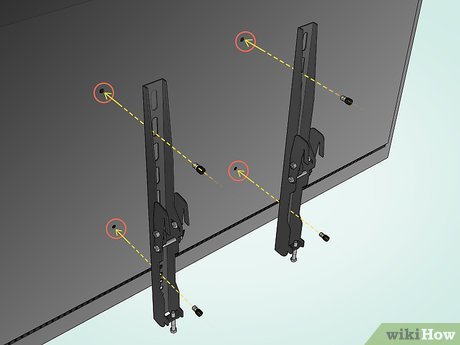
Credit: wikihow.com
Weight is not the only thing that matters
Many beginners focus only on the TV weight. That is important, but it is not the whole story.
The mount itself has weight. The movement of a full-motion arm adds leverage. The hardware quality matters too. A 40-pound TV on a weak arm mount can stress the wall more than a heavier TV on a simple fixed bracket.
Another detail people often miss is the wall condition. Drywall that has already been repaired, cracked, or softened by moisture may not be suitable for mounting, even if studs are nearby. If the wall has damage, fix that first.
Use the right tools
You do not need a huge workshop, but you do need the right tools.
- Stud finder
- Level
- Drill and drill bits
- Socket wrench or screwdriver
- Measuring tape
- Mounting kit with proper bolts
- Wall anchors only if the mount instructions allow them
Read the TV mount instructions before you start. That sounds simple, but people often skip it and then guess the bolt size or spacing. That leads to mistakes.
Mounting into studs versus using drywall anchors
There are two main approaches people use: mounting into studs or using special anchors for hollow walls. These are not equal.
Mounting into studs is the preferred method for most TVs. It gives the best strength and the lowest risk.
Special drywall anchors, such as toggle bolts or heavy-duty hollow-wall anchors, may work in some situations, but only when the mount system and TV weight fit within the anchor rating. Even then, it is still not the first choice for a large screen.
If you are wondering whether a certain anchor is enough, do not guess. Check the weight rating and compare it with the total load. And remember, the total load includes the mount, not just the TV.
| Mounting method | Best use | Strength | Risk level |
|---|---|---|---|
| Into studs | Most TVs, especially medium and large sizes | High | Low |
| Heavy-duty drywall anchors | Some light TVs or special mount systems | Medium | Medium |
| Plastic drywall anchors | Light decor only | Low | High |
For most homes, the first option is the one you want.
How to choose the right TV mount
The right mount depends on the TV size, wall type, and how you plan to use the screen. A good mount should match both the TV and the wall, not just one of them.
Check the VESA pattern on the back of the TV. This is the hole spacing used to connect the mount. Also check the mount’s weight limit. Then make sure the bracket fits your TV width and screen size.
Match the mount to the room
A bedroom TV often works well with a fixed or tilt mount. A living room TV may need a tilt mount if reflections are a problem. A full-motion mount is useful when several seating positions need a better view.
But bigger motion means more stress. If you choose a full-motion mount, your wall support must be even better.
Think about viewing height
Many people mount their TV too high. That is a comfort mistake, not just a style issue. A screen placed too high can strain your neck and make watching less enjoyable.
The center of the TV should usually be close to eye level when you are seated, depending on the room and furniture. This is not a strict rule, but it is a good starting point.
One practical tip: hold up the screen height with tape or paper before drilling. It helps you see the real position in the room.
Common mistakes people make with drywall TV mounts
A lot of wall mounting problems happen because of small errors, not major ones. The most common mistakes are easy to avoid once you know them.
- Using the wrong anchors. Light-duty anchors are not made for TV loads.
- Missing the studs. If the mount is not secured where it should be, the wall can fail.
- Ignoring the mount instructions. Each mount has specific hardware and spacing rules.
- Not checking cable clearance. Cords can bend sharply or get trapped behind the TV.
- Mounting over damaged drywall. Repairs, cracks, or damp spots weaken the wall.
Another mistake is rushing the job. People often drill too quickly and do not verify the position. If the bracket is slightly off, the TV may end up crooked or too close to another object.
Also, do not assume all studs are wood. In some buildings, metal studs are used. Those need different hardware and more care during installation.
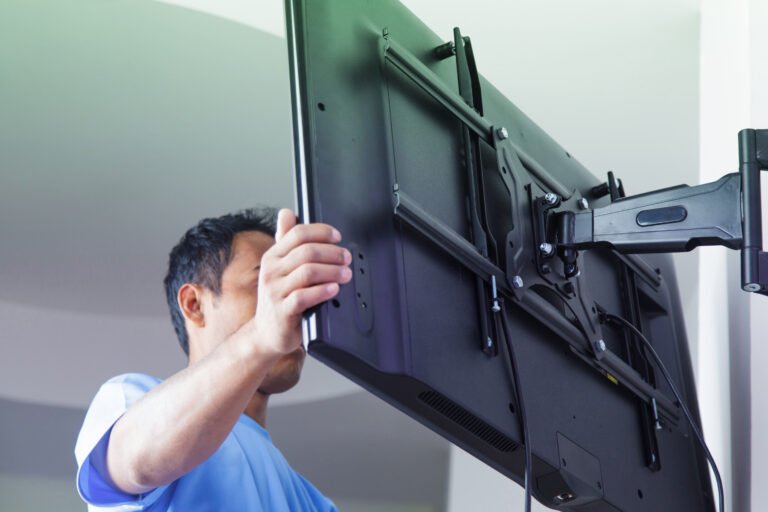
Credit: whizzyliving.com
A non-obvious issue: cable weight and movement
One detail many beginners miss is that cables can pull on the TV over time. A heavy HDMI cable or power cord can create a small but constant tug. That may not seem serious, but it adds stress to the mount and the wall.
Use good cable management. Leave enough slack so the cables do not pull tight when the screen moves. This matters even more with a swivel mount.
Another detail: vibration
If the TV is near a door, stairway, or speaker system, small vibrations can travel through the wall. This usually does not cause immediate failure, but it can loosen poor hardware faster. Strong fasteners and proper tightening help reduce this risk.
When you should not mount on drywall
Sometimes the best answer is not to mount at all, at least not until the wall is improved.
You should avoid mounting if the drywall is soft, swollen, badly cracked, or shows water damage. Moisture can weaken drywall very quickly. A wall that looks normal on the outside may already be weak inside.
Also, avoid DIY mounting if you cannot find studs, if the wall feels unusual, or if you are unsure about hidden electrical lines. In that case, a professional installer may be the safer choice.
If your TV is very large or the mount is a long-arm design, professional help can be worth it. The cost is often much lower than replacing a damaged TV or repairing a broken wall.
Step-by-step: a safe basic approach
If your wall has studs and you have a standard mount, the process is usually straightforward. Here is the general approach.
- Choose the wall position and check the viewing height.
- Use a stud finder to locate at least two studs.
- Mark the stud centers and confirm the height with a level.
- Hold the mount bracket against the wall and mark the drill holes.
- Drill pilot holes at the marked spots.
- Attach the bracket using the correct lag bolts or mount hardware.
- Check that the bracket is level and secure.
- Attach the TV to the mount and test the fit carefully.
- Manage cables so they do not pull or hang loosely.
Do not tighten bolts blindly. Tight is good, but over-tightening can damage the studs, strip the hardware, or crush the drywall surface around the bracket.
After installation, gently test the setup before fully releasing the TV. If anything shifts or creaks, stop and inspect it.
Helpful authority for safety checks
If you are unsure about wall safety, fastening strength, or general home improvement guidance, it is smart to review trusted building information from a high-authority source such as the The Spruce home improvement guides. Always compare general advice with your mount’s own instructions and your wall conditions.
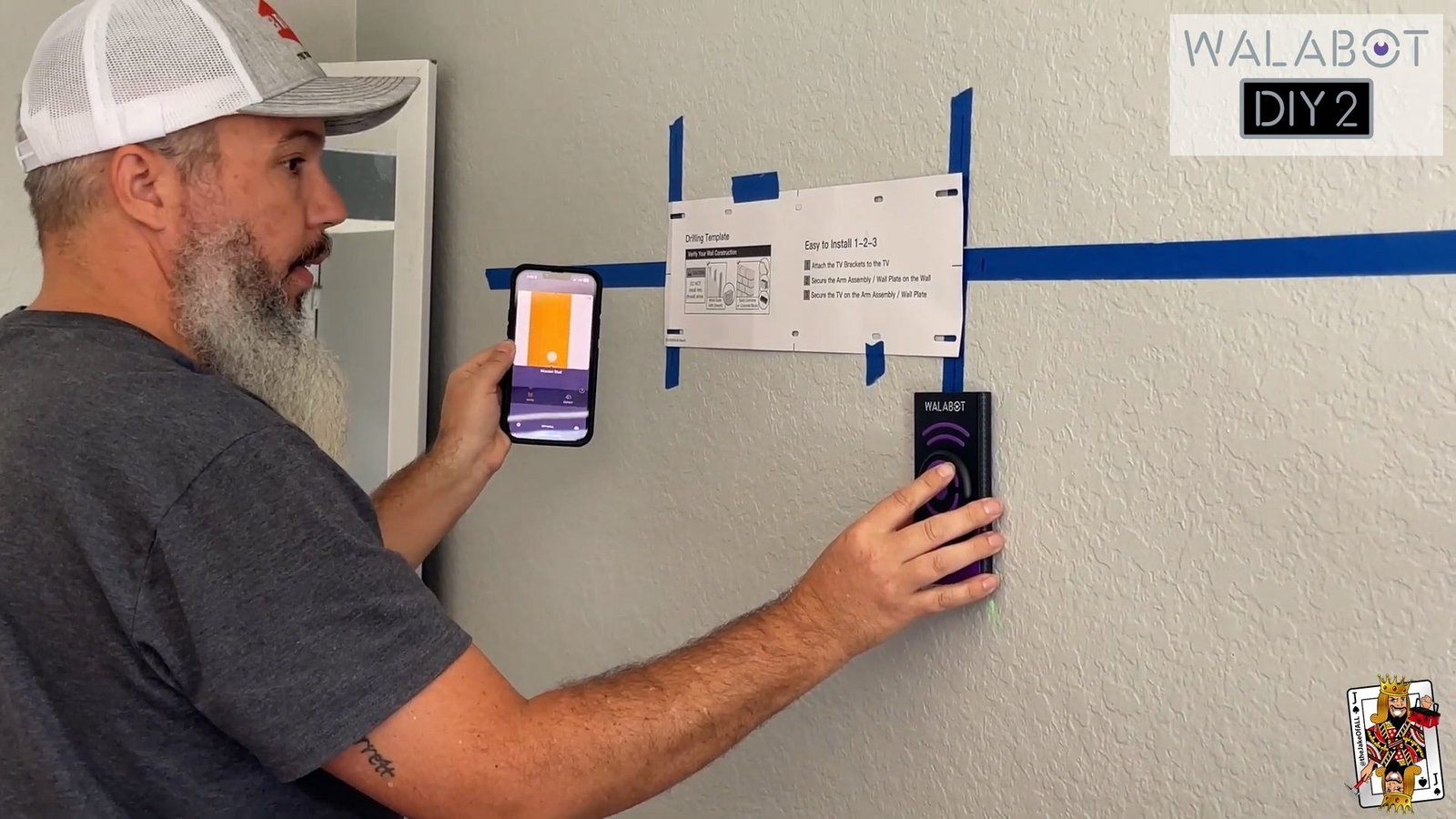
Credit: walabot.com
Final advice before you install
So, can you mount a TV on drywall? Yes, but the drywall should not be doing the heavy lifting by itself. The safest setup uses studs, the right mount, and the right hardware for the job.
If you remember only a few things, remember these: find the studs, choose the right mount, respect the weight rating, and do not trust weak anchors for a TV. Those four steps prevent most problems.
A TV mount should feel solid, stay level, and remain safe long term. If any part of the wall looks weak or uncertain, stop and fix the issue first. Good installation is not about speed. It is about confidence and support.
FAQs
1. Can you mount a TV on a drywall without studs?
Sometimes, but it depends on the TV weight, the mount type, and the anchor system. For most TVs, studs are the safest option. Drywall-only mounting is riskier and should be done only with hardware made for hollow walls and within its rated load.
2. What is the safest drywall anchor for a TV?
Heavy-duty toggle bolts or specialty hollow-wall anchors are stronger than plastic anchors, but they still are not as reliable as studs for most TVs. Always follow the mount maker’s instructions and weight limits.
3. How much weight can drywall hold for a TV?
Plain drywall is not meant to hold a TV by itself. The safe weight depends on whether the load is spread across studs or supported by approved anchors. In most cases, the wall studs should carry the weight, not the drywall sheet.
4. Can a full-motion TV mount be used on drywall?
Yes, but it needs very secure support because it creates more leverage on the wall. Full-motion mounts are best attached to studs. If the wall support is weak, choose a fixed or tilt mount instead.
5. Should I hire a professional to mount my TV?
Hiring a professional is a good idea if you cannot find studs, your wall is damaged, your TV is large, or you are unsure about electrical or structural safety. It can save time and prevent expensive mistakes.
